Flowlet writes what you meant.
Ramble at your phone like you would to a friend, mistakes and all. Flowlet turns it into a clear message, in any app.

30 minutes free · Android 8+ · iPhone coming soon
The same voice note on two keyboards.
Recorded on my phone: Google voice typing types every word, Flowlet writes the message.
Three real dictations.
Things I said out loud, and the message Flowlet typed for me.
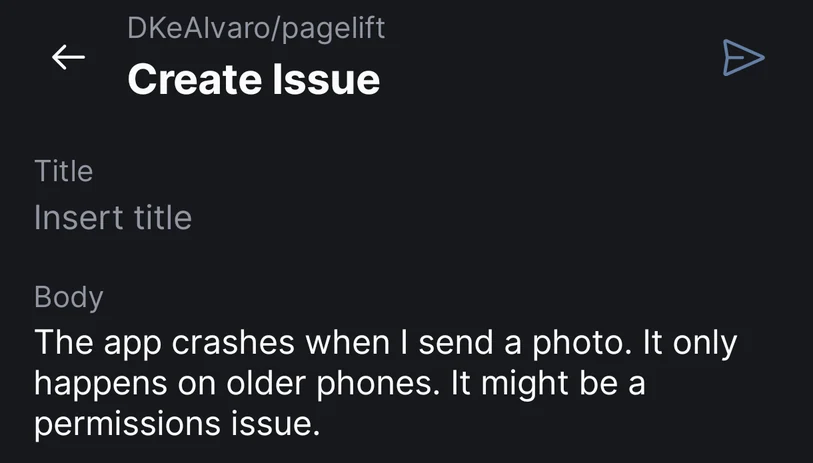
“It's the app, it crashes when I open the camera... no, when I send a photo. Only on the old phones, maybe permissions. Can you put it in a bug report?”
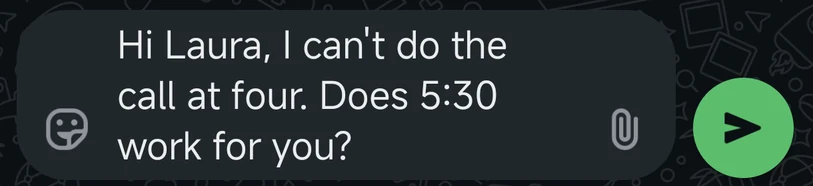
“Tell Laura I can't do the call at four, and ask her if five thirty works instead. Keep it short.”
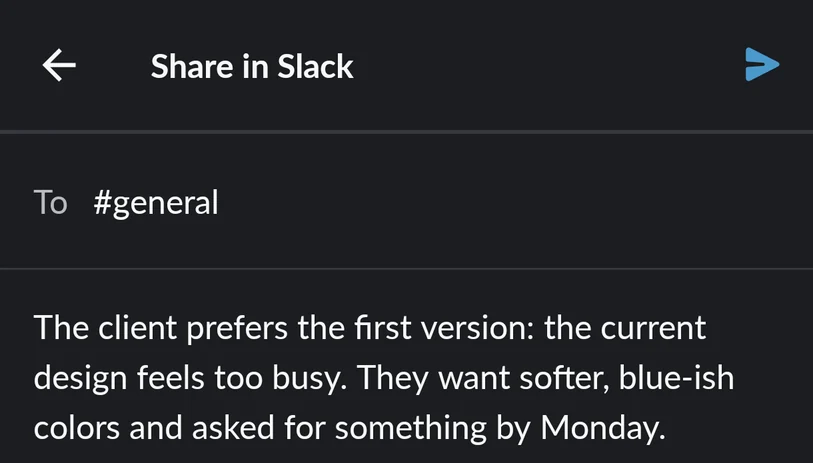
“The client said the current design feels too busy, they liked the first version better, they want the colors softer, maybe blue-ish, and they asked if we can show something by Monday.”
A bubble that works in every app.
Tap the bubble
It floats next to whatever you're typing in: WhatsApp, Gmail, Slack, your notes.
Say it however it comes out
Hesitate, repeat yourself, change your mind halfway through. No need to say “comma”.
Send the clean version
Flowlet writes the final message at your cursor, with punctuation, ready to send.
Your voice isn't kept.
The audio travels encrypted, gets transcribed and is deleted as soon as the text comes out. Your dictations are never used to train models.
On Android, Flowlet uses the accessibility permission only to put the text in the field you're typing in. It doesn't read your screen.
Privacy policyPay for the time you talk.
No subscription needed, and your credits never expire.
To start
Free
Your first 30 minutes of dictation.
Pay as you go
€0.99/ hour
Or 10 hours for €9.99. Buy more only when you run out.
Your own keys
€24once
Pay once and use Flowlet with your own Groq and OpenAI keys.
Talk every day? Pro is €5.99 a month for up to 30 hours.
For comparison, Wispr Flow costs €12 a month.
“I built Flowlet for myself. Now, whenever I have to write something long, I just ramble at my phone without overthinking it, knowing the text will come out clean.”
Common questions.
All questionsHow is it different from Gboard or iPhone dictation?
Those write every word you say, ums and corrections included, and you fix the text afterwards. Flowlet listens to the whole thing and writes what you meant: the final version, with punctuation, ready to send.
Does it change what I say?
It removes what doesn't belong in the message (filler words, repeats, false starts) and applies your corrections. It keeps your words and your tone, and never adds anything you didn't say.
Does it work in any app?
On Android, yes: the bubble shows up wherever the keyboard opens. The iPhone version is coming soon.
Which languages does it understand?
English, Spanish, Dutch, French, German, Portuguese, Italian, Polish, Russian, Arabic, Chinese and Japanese.
Do I need an internet connection?
Yes. The transcription and the cleanup run on our servers, which is what makes it fast and accurate on any phone.
Which phones does it work on?
Android 8 or later. iPhones with iOS 18 or later when the iPhone version is out.